Logo
Pet Lovers Centre Singapore
Track Order Stores VIP Membership
简体中文
Submit a request
  1. PLC Help Centre
  2. Help Centre Category
  3. General Enquiries
  4. Customer Service Support

How to link Live Chat conversation to WhatsApp?

Updated October 04, 2022 03:18

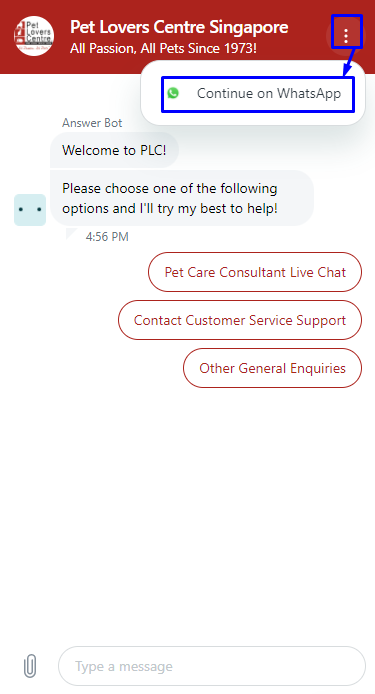
To link Live Chat conversation to WhatsApp, simply click on the "3 dotted-line icon" located at the top right window. 

You may also refer to the screenshot below for reference: 
mceclip2.png

Was this article helpful?
1 out of 5 found this helpful

Articles in this section

  • Contact Us
  • How can I leave a compliment for your staff?
  • (马)Marvellous New Year Sale Lucky Draw 2026
  • Spend a Minimum of $65 to Get 2 Free Trustie Poo Bags (15 pcs each)
  • Scam Alert: Protect Yourself from Fraudulent Campaigns
  • IP Blocked Issues on Website
  • Do you accept SG60/CDC Voucher?
  • I'm encountering Error 403 / 404, what should I do?
  • Veterinary Clinics
  • Gift Vouchers Terms and Conditions
See more
Submit Request
Please complete this form and we’ll get back to you as soon as we can.
Find us on WhatsApp
If you prefer to message us via mobile communication, please feel free to drop us a text at +65 8875 4869!

© PLC Help Centre

Pet Lovers Centre Singapore. All rights reserved.

Facebook Twitter YouTube LinkedIn Instagram
How may we help?